
Threads & replies
Chain follow-up posts to build a thread.
A post can be more than one entry. Add follow-ups to build a thread (on X) or a post with comments, depending on the platform.
Add to a thread
Below the editor, click the add button. Its label matches what the platform supports:
| Label | Platform behavior |
|---|---|
| Add post | Another post in the thread (e.g. X). |
| Add comment | A comment/reply under the post. |
| Add comment or post | The platform supports either. |
Entries appear as Main post, Reply 1, and so on — reorder them with the arrows or delete one with the trash button. The channel preview shows the whole chain as it will look on the platform.
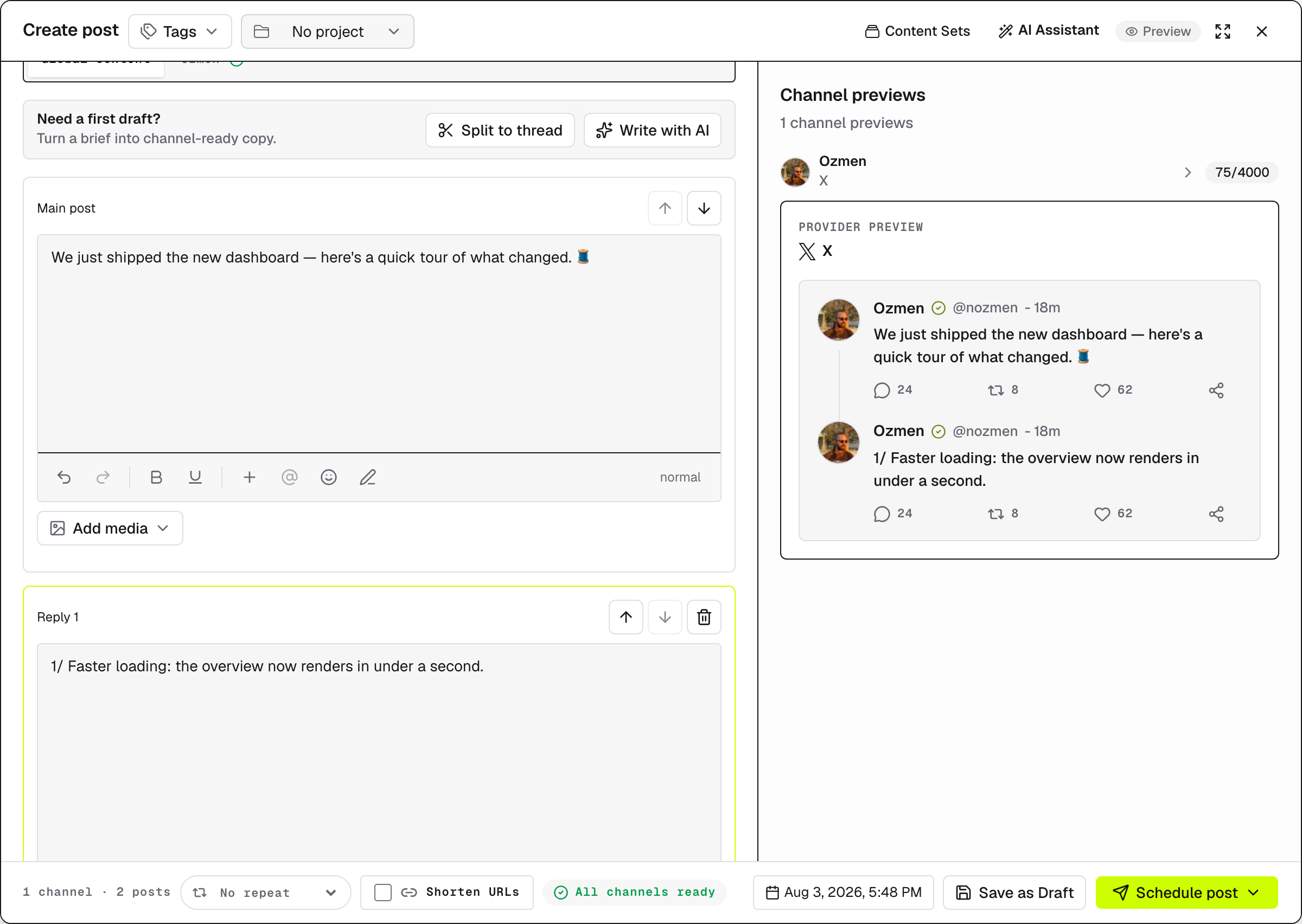
Split long copy automatically
Wrote everything in one block? Click Split to thread — EveryFeed divides the first entry at the active channel's character limit, looking for clean sentence boundaries. Media and the reply delay stay on the first entry, and the result is a normal editable draft.
Two cases to know:
- If the text already fits, nothing changes: "This post already fits the selected channel limit."
- Rich HTML content isn't split automatically: "HTML posts cannot be split safely. Switch to plain copy first."
Platform differences
- Providers that support only a single post hide the add button entirely.
- On some platforms replies can't carry media — attachments stay on the first entry.
- Posting to several channels? Open a channel's tab to see how the thread lands there — see Post to multiple channels.