
Validation before publishing
Catch issues for each channel before a post goes out.
As you write, the composer checks your post against each selected channel's rules — problems surface before you schedule, not after.
Per-channel readiness
Each channel in the preview rail shows its own character count and state:
| Badge | Meaning |
|---|---|
| Ready | The post meets that channel's rules. |
| N issues | That many things need fixing for that channel. |
| Not checked | Validation hasn't run for it yet. |
While it runs you'll see "Checking latest provider rules" — rules come from current platform limits, not a static list.
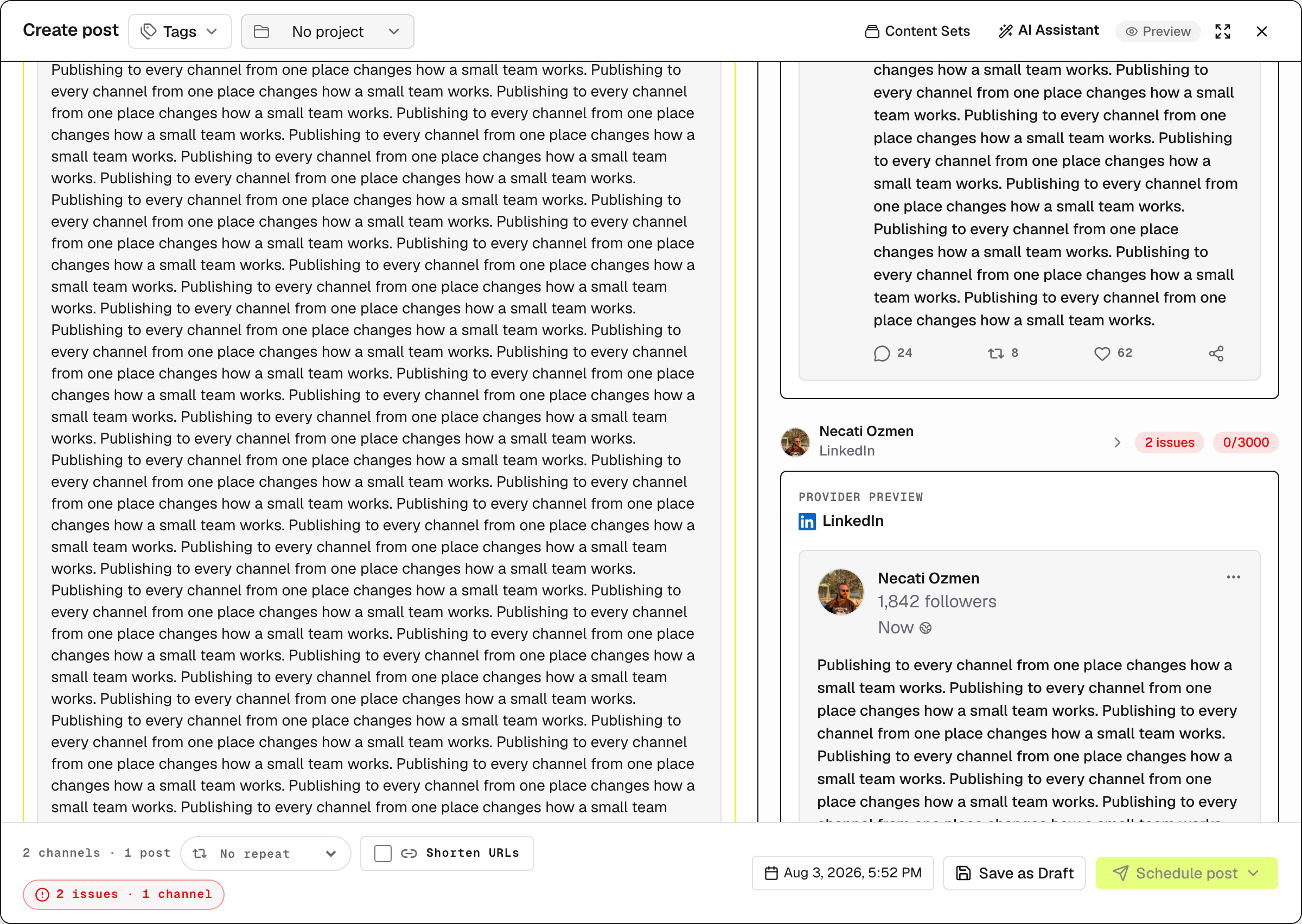
Here the same copy fits X's 4,000-character limit but is too long for LinkedIn's 3,000 — so only LinkedIn is flagged.
Review and fix
The footer sums it up: All channels ready, Checking channels, or a red N issues · N channel count. Click Review issues to see every issue listed per channel (a missing field, No media, an over-limit text). Fix them in the editor or that channel's settings and the badges update.
Issues block publishing, not drafting
While any channel has issues, Schedule post and Post Now stay disabled. Save as Draft always works — park it and fix things later.